


Retro — Photos with Friends
4.687.00 Reviews
App Specs
- Version
- 2026.08.1106
- Updated On
- License
- Free
- Downloads
- 1,000,000+
- Developer
- Lone Palm Labs
- Categories
- Photography
- Platform
- Android
Screenshots
 Analysis by AppCompare
I usually reach for a photo app when I want to do something with pictures beyond leaving them buried in my camera roll. Retro — Photos with Friends is aimed at that moment: turning everyday images into nostalgic-looking keepsakes and making it easier to share them with people close to you. Its appeal is less about replacing a serious editing tool and more about giving friends a relaxed way to make a small collection of photos feel connected.
That distinction matters before you start. If you want exact control over color, exposure, and retouching, a full-featured editor is a better fit. If you enjoy the look of older prints and want the social side of a shared album, Retro has a more focused idea. I’d approach it as a place to make and pass around memories, rather than as the one photo library or editing tool I rely on for everything.
A good fit for a shared moment
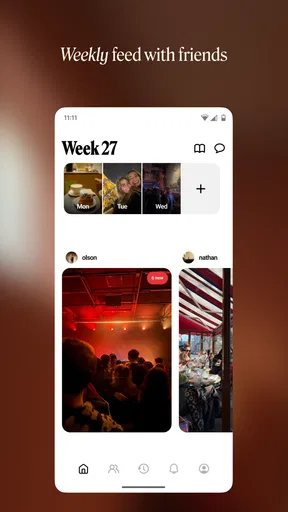
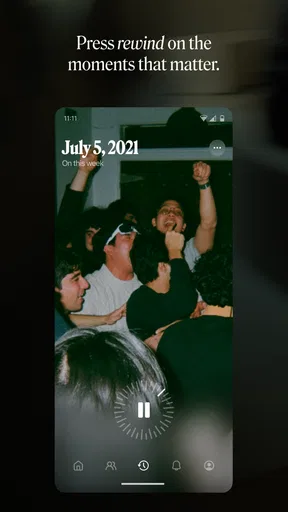
I can see the app working well after a dinner with friends, a weekend outing, or a family get-together where several people have taken pictures. Instead of asking everyone to send files one by one, the group can contribute to a shared collection and give the images a consistent, nostalgic feel. That makes the album itself part of the memory: people can look back at the set together, rather than searching through separate chats.
For a practical routine, I’d make a habit of choosing a handful of photos at the end of an event, then adding them to the shared album while the details are still fresh. I wouldn’t try to include every near-duplicate. A smaller selection gives the collection a clearer story and makes it easier for friends to browse. The useful trade-off is that this takes a little curation, but it can feel more personal than automatically dumping a whole camera roll into one place.
What to decide before inviting friends
The social setup is part of the point, but it also means the experience depends on other people joining in. If your friends prefer not to add another app or account, you may end up making the album mostly on your own. In that case, the retro styling can still be enjoyable, but the shared-memory side will be less compelling. I’d invite the people who actually took part in the event, not every contact, so the album stays relevant and comfortable for everyone involved.
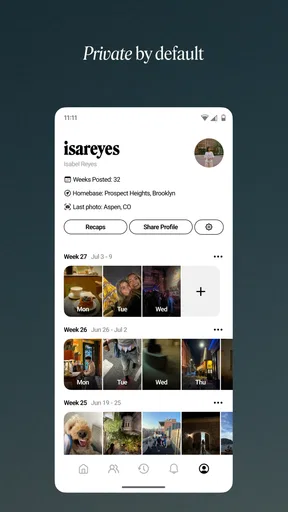
It’s also worth thinking about how you want to share a photo before editing it. A picture intended for a private group album can be chosen differently from one you plan to post publicly. I’d keep especially personal images out of a wider sharing flow unless everyone pictured is happy with that. That small pause is useful in any social photo app, and it helps keep a casual creative tool from turning into an awkward conversation later.
Where it sits among photo apps
Compared with a standard phone gallery, Retro gives the act of collecting pictures a more social and styled purpose. A gallery is usually better for finding, sorting, and keeping original shots; a messaging app is faster for sending one image to one person; and a conventional editor is stronger when you need detailed adjustments. Retro’s niche is the middle ground: make pictures feel like a set, then share that set with friends.
Worth Reading Before You Choose

EA SPORTS FC Mobile 26 Is a Bigger Football Game, but It Takes Time

Flipboard Shows What News Apps Must Do Beyond the Feed

Switching to Android Auto Means Rethinking Your Driving Routine

Google Calendar Makes a Crowded Week Easier to Manage

Ludo King Makes the Most of the Minutes Between Plans

Baby Panda World Brings Quick Play to Modern Phones, but Its Game Library Feels Busy
I wouldn’t use it as my only archive. Keeping original photos in the usual place on your device gives you more flexibility if you later want to edit them differently or use another service. Treat the shared album as a presentation layer for selected memories, not the sole copy of anything you’d hate to lose. That simple habit avoids tying your only version of a meaningful photo to any one app or social workflow.
Who may want something else
Retro is most appealing if you like a recognizable vintage look and expect to share photos with a willing group. It is less suited to someone who wants neutral, true-to-life images, precise manual editing, or a private, offline-first filing system. If your main need is backing up thousands of photos and searching them later, your device’s gallery or a dedicated photo-storage service will make more sense. If your goal is careful retouching, choose an editor built around those controls instead.
There’s also a style trade-off: a filter that makes one sunset or portrait feel warm can make another image look overly processed. I’d compare a few looks on the same picture before settling on one, especially when skin tones or indoor lighting are involved. The point is not to force every photo into the same treatment; a collection can feel more natural when you use the effect selectively.
Getting Started with Retro
First off, downloading Retro — Photos with Friends is a breeze. Available on both Android and iOS, it takes just a few taps to get it onto your device. Once installed, you're met with a clean and straightforward interface. No complicated menus or overwhelming options — just pure simplicity, which is a breath of fresh air.
Setting up is as easy as pie. You have the option to sign in using your social media accounts or create a new login. I went for the latter, and within minutes, I was ready to start my retro journey. The app prompts you to invite friends, which is a nice touch, keeping the whole experience social and interactive.
Diving into Features
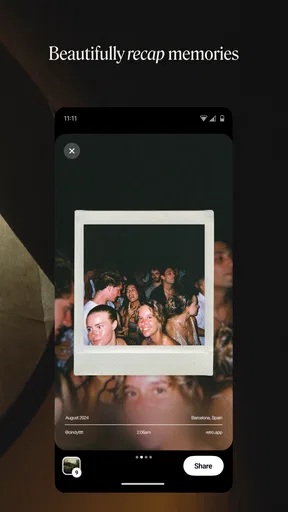
This app is all about taking your photos and transforming them into stunning retro pieces. Think of those classic Polaroid vibes or the grainy feel of a vintage film camera. The filters are where the magic happens. They're not just your standard black and white; they’re meticulously crafted to mimic the styles of past decades.
One of my personal favorites is the 80s filter — it adds just the right amount of neon flair without going overboard. You also get a selection of frames to choose from, which is perfect for those who love adding a little extra to their photos. And guess what? You can create collages with ease. Just drag and drop your images, apply your favorite filters, and voilà!
Sharing the Nostalgia
Once you've crafted your masterpiece, sharing it is as simple as it gets. The app integrates seamlessly with all major social media platforms, so you can post directly without any hassle. Plus, you have the option to send your photos to friends within the app itself, creating a shared album of memories. It's like having a virtual photo album that everyone can contribute to.
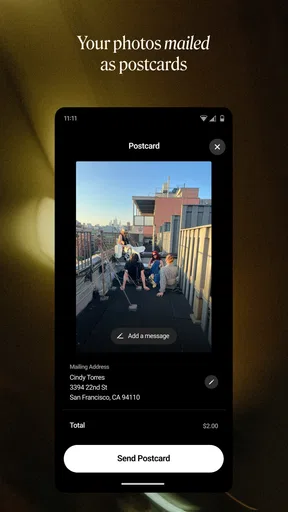
There's also a cool feature that allows you to print your photos. Yes, print! Imagine holding those retro vibes in your hands. The app connects with various printing services, allowing you to order prints directly from your phone. I've already got a few hanging on my wall, and let me tell you, they look fantastic.
User Experience
Now, onto how it feels to actually use the app. The user interface is intuitive, and everything flows smoothly. I didn't encounter any glitches or slowdowns, which is always a plus. Navigation is straightforward, and all the features are accessible with just a few taps.
One thing that stood out to me is how the app encourages creativity. It doesn't just slap a filter on and call it a day. Instead, it invites you to play around with different styles, mix and match frames, and really put your own spin on things. It's like being in a digital art studio where the only limit is your imagination.
Checking the practical details
Retro is a free photography app from Lone Palm Labs, with optional in-app purchases priced from $1.99 to $35.99 per item. I’d start with the free experience and decide whether the extra options genuinely fit how I make albums, rather than paying just because a feature looks appealing in the moment. If you’re setting it up for a group, it’s sensible to check that everyone is comfortable with the same arrangement before building a shared routine around it.
The app is rated for Everyone and has an average rating of 4.6 from around 8,100 ratings, with more than a million installs. Those figures suggest it has found an audience, but they don’t tell me whether the particular style or social setup will suit my circle. I’d use them as context, then judge it by whether the people I want to share with are willing to participate.
A small workflow that makes the results better
For an everyday example, imagine I’ve spent the afternoon at a market with a friend. I’d pick a few varied shots—one of the place, one candid, and one detail—rather than five versions of the same pose. Then I’d test the retro treatment on each image, because a grainy look can add character to a sign or street scene but may distract from a face. Once the set feels coherent, I’d add it to the shared album and let my friend contribute their own angle.
That order is useful because it separates selection from styling. When I apply effects while still deciding what belongs in the album, it’s easy to keep a weak image just because its filter looks fun. Choosing first makes the final group stronger, and leaving room for a friend’s photos keeps the result from feeling like a one-person recap. A collage is better saved for a few images that belong together; packing too many into one layout can make the details hard to enjoy.
There’s a handoff to consider if you want a physical keepsake. A digital album is convenient for browsing and contributing, while a print turns a selected image into something to display or give away. I’d choose the print only after checking the photo at the size and crop I want, because a composition that looks good in a small phone preview may not feel as balanced on paper. For a group gift, asking contributors to agree on the final image first can prevent surprises.
Where the flow can feel less effortless
The app’s simplicity is a strength when I want to make a quick, playful album, but it can also be limiting if I want to fine-tune every part of an image. The filters and frames encourage a particular mood; they aren’t a substitute for a detailed editing workspace. I’d switch to a more advanced editor when a picture needs careful exposure correction, a precise crop, or restrained color work, then use Retro for the shared presentation if that still suits the group.
Social sharing also adds small points of friction that a solo editor avoids. Friends need to be interested, the group needs to agree on what belongs in the album, and a public post may not be appropriate for every image. I’d keep the original photos accessible outside the app and use the shared collection for chosen copies or moments. That way, a disagreement about a filter or a change in plans doesn’t affect the only version of a picture.
Retro is currently version 2026.05.1006 and requires Android 10 or later on Android devices. Before inviting a group, I’d make sure the people who want to participate can use the app on their phones; otherwise, a shared folder or ordinary messaging thread may be the smoother choice. That is not as distinctive, but the best workflow is the one everyone will actually use.
My take after following the full loop
In a world where everything is fast-paced and high-tech, Retro — Photos with Friends offers a delightful escape into the past. It's more than just an app; it's a way to connect with friends, share memories, and unleash your inner artist. Whether you're a fan of vintage aesthetics or just looking for a fun way to spice up your photos, this app is definitely worth checking out.
So, if you're ready to bring a touch of nostalgia to your digital life, give Retro — Photos with Friends a try. Who knew going back in time could be so easy and enjoyable?
Pros
- Nostalgic filters enhance photo quality.
- User-friendly interface for quick edits.
- Seamless social media integration.
- Variety of creative editing tools.
- Offline use without losing features.
Cons
- Limited free filter options.
- Occasional app crashes reported.
- Ads can be intrusive at times.
- Premium version is pricey.
- Slow loading on older devices.
FAQs for Retro — Photos with Friends
What is Retro — Photos with Friends, and how does it work?
Retro — Photos with Friends is a social photography app designed to create and share vintage-style photos. Users can apply a variety of retro filters, frames, and effects to their images, giving them a nostalgic feel. The app also allows users to share these photos with friends directly within the app or on social media platforms.
Is Retro — Photos with Friends available for both Android and iOS devices?
Yes, Retro — Photos with Friends is available for download on both Android and iOS devices. You can find it on the Google Play Store for Android users and the Apple App Store for those using iOS devices. Make sure to check for compatibility with your device's operating system version before downloading.
Does Retro — Photos with Friends require an internet connection to use?
An internet connection is required for some features of Retro — Photos with Friends, such as sharing photos with friends and accessing newly released filters and effects. However, users can edit and apply effects to their photos offline, saving them to their device to share later when connected to the internet.
Are there any in-app purchases or subscription options in Retro — Photos with Friends?
Retro — Photos with Friends offers both free and premium options. While the app is free to download and use, it includes in-app purchases for additional filters, effects, and frames. There may also be a subscription option that provides access to exclusive content and features, enhancing the user experience.
How can I ensure my privacy while using Retro — Photos with Friends?
To ensure privacy while using Retro — Photos with Friends, users are advised to review the app's privacy settings and policies. The app may request access to your camera and photo library, but users can control what is shared publicly. Always check the permissions the app requires and adjust your settings accordingly to maintain control over your personal information.


